Doctors manage multiple responsibilities throughout the working day, from reviewing patient information to conducting consultations and updating records. When important information is difficult to access, routine administrative tasks can interrupt the consultation workflow.
Doctor App for Hospitals Doctor App for Hospitals: Features That Support Daily Consultations
Doctors manage multiple responsibilities throughout the working day, from reviewing patient information to conducting consultations and updating records. When important information is difficult to access, routine administrative tasks can interrupt the consultation workflow.
A doctor app can bring selected patient and operational functions into a mobile-friendly interface, depending on the software's capabilities.
What Is a Doctor App for Hospitals?
A doctor app is a software application designed to help doctors access relevant patient information and perform selected clinical or administrative tasks.
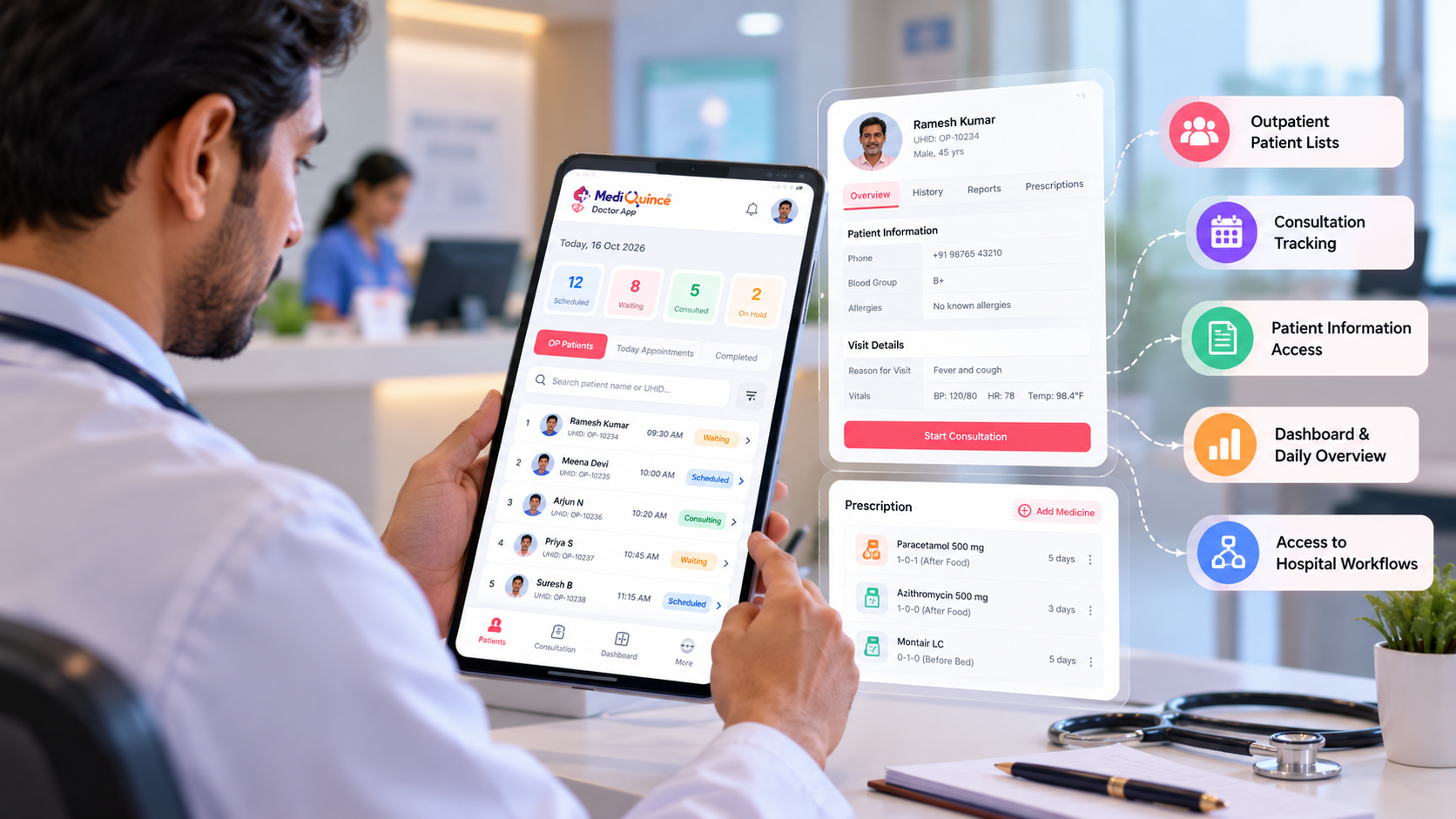
Depending on the application, features may include outpatient patient lists, appointment information, consultation status, dashboards, and access to related hospital functions.
Hospitals should evaluate which functions are available on mobile and which still require the main hospital system.
Important Features to Look For
1. Outpatient patient lists
A clearly organized patient list can help doctors review scheduled or waiting patients and understand the current consultation queue.
2. Consultation tracking
Consultation status can help doctors and staff understand which visits are open, on hold, or completed, where these options are supported.
3. Access to relevant patient information
Doctors may need patient details and relevant visit information before beginning a consultation. The app should provide appropriate access while protecting confidentiality.
4. Dashboard and daily activity overview
A useful dashboard can help doctors review selected information about appointments and outpatient activity.
5. Access to related workflows
Hospitals should verify whether the app supports the specific workflows their doctors use, such as admissions, billing access, or laboratory-related functions.
How a Doctor App Can Support Daily Work
Consider a doctor beginning an outpatient session. The doctor opens the patient list, reviews the queue, checks relevant patient details, and updates consultation status as visits progress.
This type of structured workflow can make it easier to coordinate daily consultations. The actual benefits depend on usability, the accuracy of the information, and how well the app fits existing hospital processes.
What Hospitals Should Check Before Choosing a Doctor App
- Compatibility with the hospital's existing software.
- The patient and appointment information available.
- Access permissions and patient-data protection.
- Ease of use on supported mobile devices.
- Performance under normal working conditions.
- Support and training for clinical staff.
Hospitals should also verify how the application handles connectivity interruptions and access to sensitive information.
The Mediquince Doctor's App
The Mediquince Doctor's App describes outpatient patient lists, consultation workflows, patient admission access, dashboards, and shortcuts to selected hospital functions.
Hospitals can use a demo to assess how these functions fit their doctors' daily routines.
Quick Tip
Quick Tip Before choosing a doctor app, ask doctors to test it using their actual daily consultation workflow. Check patient-list navigation, information access, consultation updates, and usability on the mobile devices they use.
FAQs
1. What is a doctor app for hospitals?
It is a mobile application that provides doctors with access to selected patient information and hospital workflows.
2. What features should a doctor app include?
Useful features may include outpatient patient lists, consultation tracking, appointment information, dashboards, and controlled access to patient records.
3. Can doctors manage outpatient consultations through a mobile app?
Some applications support outpatient lists and consultation workflows. The exact tasks available depend on the product.
4. Is a doctor app the same as hospital management software?
Not necessarily. A doctor app may provide a focused interface to selected functions, while an HMS covers broader hospital operations.
Conclusion
A useful doctor app should support real clinical workflows rather than simply reproduce a desktop dashboard on a phone. Evaluate the patient information, consultation features, usability, and access controls before making a decision.

Mediquince Product Team
The team that designs, implements and supports Mediquince HMS for hospitals, clinics, labs and pharmacies.